history
The history subcommand lets you view and re-run past command executions. Every time you
run a saved command, CmdBox records it, including which variables were used. This makes it
easy to repeat a previous run exactly as it was, without having to remember or retype
anything.
The available subcommands for history are:
The --profile flag
list, show, rerun, and clear all accept --profile (or -p) to target a profile other than the currently
active one. For show and rerun, note that an index-style reference (e.g. cb history show 3) is resolved
within the given profile, "3rd most recent" means something different in each profile's own history.
list
The list subcommand displays your most recent command executions.
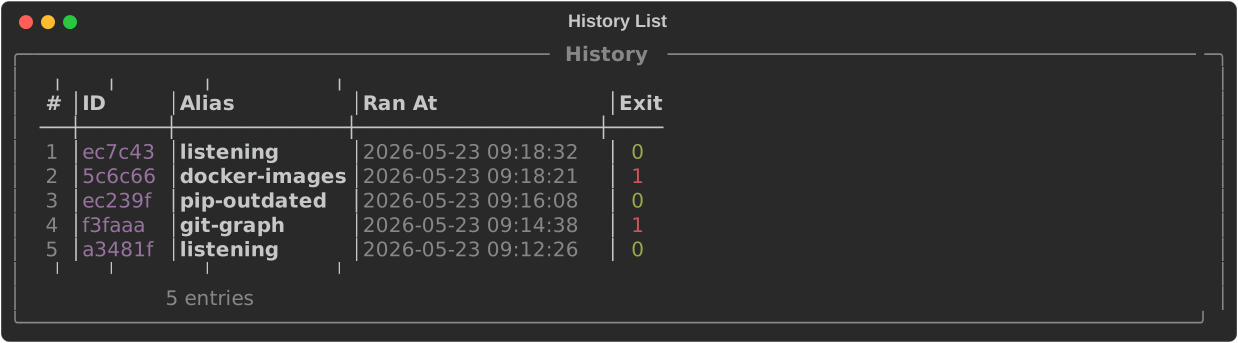
By default, the 25 most recent entries are shown. Use the --limit flag to show more or fewer.
To see the history for a specific command only, use the --alias flag.
Each entry in the list has an index number on the left. This index can be used with
show, rerun, and other subcommands to reference a specific entry.
show
The show subcommand displays the full details of a single history entry, including the
alias, the resolved command, the variables that were used, and when it was run.
Provide either the index number from history list or the beginning of the entry's ID.

rerun
The rerun subcommand re-executes a past command using the exact same variables it was
originally run with.
This is useful when you need to repeat a command that used a specific set of variable values without having to supply them again.
Tip
Not sure which entry you want? Run cb history list first to find the index, then
use cb history show <index> to confirm it before rerunning.
last
The last subcommand re-executes the most recent command in your history, using the same
variables it was run with.
This is a quick shorthand for the common case of simply repeating the last thing you ran.
clear
The clear subcommand removes entries from your history.
You will be prompted to confirm before anything is deleted.
To skip the confirmation prompt, use the --yes (or -y) flag.
To clear the history for a specific command only, use the --alias flag.
The two flags can be combined.
Warning
Cleared history cannot be recovered.